Acumatica reporting beyond generic inquiries and pivot tables.
Generic inquiries are the best list builder in any mid-market ERP. Tau picks up where they stop: paginated output with real page breaks, matrices, dashboards that drill to the lines, and PDFs on a schedule.
Where Acumatica reporting stops being quick.
Generic inquiries and pivot tables are genuinely good. Then someone asks for the same numbers as a printed document, and you are in the Report Designer: a separate Windows application and a layout that takes days to get pixel-perfect.
Acumatica dashboards are widgets over inquiries, which works until you want one filter across every widget or a right-click drill to the orders behind a bar. Scheduling a PDF pack, or one statement per customer, is a project each time.
“The spinning wheel just spins.”
“No way to preview report changes without saving them to the server.”
How Tau connects to Acumatica.
Self-hosted or private cloud, Tau connects to the database behind Acumatica with a read-only login and reads it directly, tenant by tenant. No Acumatica-specific connector is needed.
On Acumatica SaaS, where the database is not exposed, publish the generic inquiries you need. Tau keeps an up-to-date copy of them beside the reporting engine, refreshed every minute and within seconds when Acumatica pushes changes, and runs every report on that copy.
Runs on your server. Windows, Linux, or a container. Nothing leaves your network unless you schedule a delivery.
An Acumatica Report Designer and Generic Inquiry alternative.
Generic Inquiries stay useful for lists inside Acumatica. Tau is for the report that has to look finished, drill, or land in an inbox.
| What you need | With Generic Inquiries, pivot tables, and the Acumatica Report Designer | With Tau |
|---|---|---|
| Printed forms and packs | Report Designer, a desktop app; layout changes need a developer or a patient administrator. | Printed reports designed in the browser, with group totals and page numbers; imports Crystal layouts. |
| Lists and quick views | Generic Inquiries. Keep them for lists inside Acumatica. | Tau reads the same data for anything that needs layout or delivery. |
| Pivots | Pivot tables on a Generic Inquiry, not printable, limited formatting. | A matrix with pivot columns, subtotals, and conditional formatting, printable. |
| Dashboards | Acumatica dashboards, widgets bound to Generic Inquiries, reloaded on every login. | Dashboards that drill to the rows, with filters that narrow every visual. |
| Delivery | Scheduled exports and notification templates, set up per report. | Scheduled PDF or Excel, one file per customer or branch, with delivery history. |
Power BI on Acumatica, and what OData leaves out.
Power BI reads Acumatica through OData feeds over generic inquiries: one inquiry per question, each modelled and refreshed on a schedule, and a printed form still means the Report Designer. Tau reads the database directly, or copies the inquiries you publish, and prints from the same query.
Reports Acumatica teams build first.
The same report types run in the demo on Northstar Coffee, an invented company.
Open sales orders by customer
Grouped by customer with order, line, and shipment status in bands, page N of M, sent as a PDF to each rep on Monday.
Inventory valuation matrix
Item classes down the side, warehouses across the top, quantity and cost in each cell, with a drill to the rows.
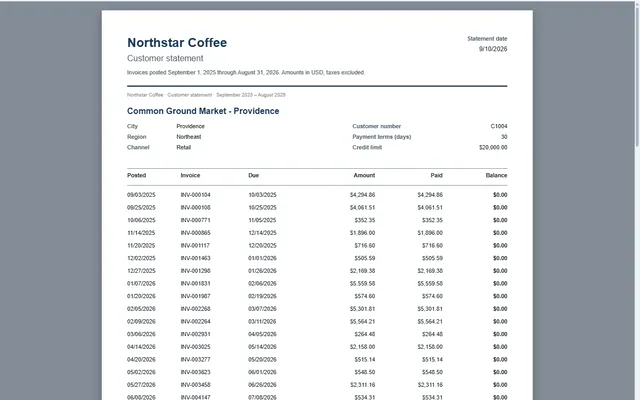
Customer statement
Pixel-perfect statement with your header, invoice detail, payments, and aged buckets, one PDF per customer.
AP aging dashboard
Open payables by vendor and bucket, scheduled as Excel with live formulas, and a click through to the bills.
Tau and Acumatica: the questions we get asked.
Does Tau respect Acumatica tenants and restriction groups?
Tau keeps each tenant's data separate. Restriction groups do not carry over automatically, so Tau controls who sees what through its own spaces, groups, and per-report permissions.
Does Tau replace the Report Designer?
For printed reports built from your data, yes: bands, groups, running totals, subreports, and page numbers, designed in the browser. Document forms printed from inside a screen stay where they are.
See it on your Acumatica data.
Tell us how you run Acumatica and the report you wish you had. We will build it with you, live.