NetSuite reporting that goes past saved searches.
Saved searches answer the first question. Tau handles the printed statement, the subtotaled pack, the matrix by rep and month, and the Monday PDF.
Where NetSuite reporting runs out of road.
A saved search is built one record type at a time. Joining transactions, items, and customers means layered formulas only their author can follow, and a search that works for one subsidiary often breaks for another.
SuiteAnalytics Workbook adds pivots and charts, but not a printed document. Financial Report Builder covers the statements. Anything operational, such as open orders by rep or a three-page customer statement, ends up in Excel.
“saved searches with certain criteria were suddenly either really slow or timing out”
“You can't join 2 searches.”
How Tau connects to NetSuite.
Tau signs in with a read-only login your NetSuite administrator approves. It keeps an up-to-date copy of the record types you choose beside the reporting engine, refreshed every minute and within seconds when NetSuite pushes changes. Reports run on the copy, so dashboards open at once and nothing in Tau slows NetSuite down.
If NetSuite data already sits in a database for another tool, Tau reads that directly. SuiteAnalytics Connect is optional and only speeds up the first load of large transaction history.
Runs on your server. Windows, Linux, or a container. Nothing leaves your network unless you schedule a delivery.
A SuiteAnalytics alternative for the reports that have to print, pivot, or leave NetSuite.
Saved searches stay the right tool inside NetSuite. Tau takes what they hand off to Excel: the printed pack, the matrix, the scheduled PDF, and the question that spans two systems.
| What you need | With saved searches and SuiteAnalytics Workbook | With Tau |
|---|---|---|
| Printed statements and packs | Export to Excel or PDF, then lay out by hand. | Finished printed reports with group totals, page numbers, and one PDF per customer. |
| Pivot by rep, month, class | Workbook pivots, rebuilt for each dataset, not printable. | A matrix with subtotals and percentages you can print and drill into. |
| Joins across record types | Layered formulas in one saved search, readable only by its author. | One report across record types; the assistant builds the join for you. |
| Scheduled delivery | A saved-search email with a spreadsheet attached. | Scheduled PDF or Excel to a list, one file per customer or rep. |
| Who can build | A NetSuite administrator who knows the search builder. | Anyone who can ask a question; the person who knows the data reviews it. |
Power BI on NetSuite, and why teams look for an alternative.
Microsoft ships no NetSuite connector, so Power BI goes through SuiteAnalytics Connect and a gateway, then a model written in DAX, then a license per viewer. Tau connects with a read-only login, writes the report from a question, and prints it from the same query.
Reports NetSuite teams build first.
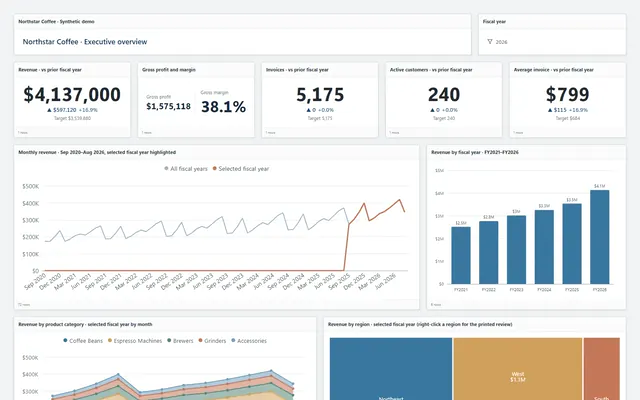
The same report types run in the demo on Northstar Coffee, an invented company.
Open sales orders by rep
Grouped by rep with backordered lines flagged, page N of M, emailed as a PDF to each rep every Monday.
Customer statements
One PDF per customer with invoices, credits, payments, and the aged balance, sent on the first of the month.
Item margin matrix
Item class down the side, location or month across the top, cost, revenue, and margin in each cell.
Receivables dashboard
Aging by subsidiary, month-end balances, collections by method, and a right-click drill to the invoices.
Tau and NetSuite: the questions we get asked.
Does Tau replace saved searches?
No. Keep them for lists and alerts inside NetSuite. Tau is for reports that need layout, printing, pivot columns, scheduled delivery, or data from a second system.
Do I need SuiteAnalytics Connect?
No. A read-only NetSuite login is enough. Connect only speeds up the first load of very large history.
See it on your NetSuite data.
Tell us how you run NetSuite and the report you wish you had. We will build it with you, live.