Business Central reports without waiting on Power BI or a Jet license.
Tau keeps a copy of your Business Central data refreshed every minute and turns it into printed statements, dashboards, matrices, and scheduled deliveries. On-premises, it reads the database directly.
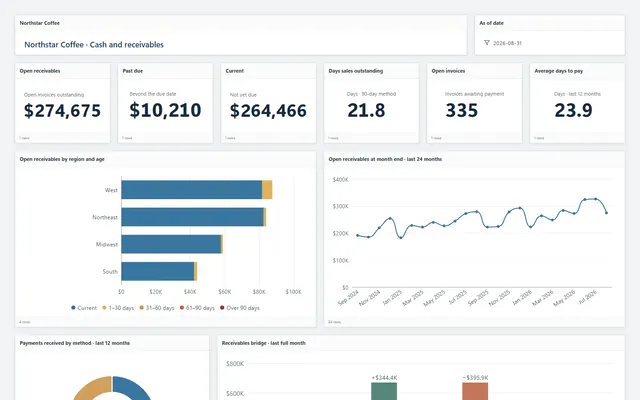
Where Business Central reporting gets expensive.
Changing a built-in report means a developer, an extension, and a layout that fights every adjustment. So most teams bolt on a second tool. Jet Reports lives in Excel and is licensed per seat. Power BI needs a model, refreshes on a schedule, and does not print a statement.
Both read Business Central live. It hands data out in small pages and is slow to filter, so a report that goes back to it every time someone opens it is neither fast nor kind to the people posting in it.
“refreshes taking anywhere from 45 minutes to 2 hours and failing multiple times a week”
“you end up chasing data across half the system”
How Tau connects to Business Central.
Online, Tau signs in with a read-only login your administrator approves. It keeps an up-to-date copy of the tables you choose beside the reporting engine, refreshed every minute and within seconds when Business Central pushes a change. Reports run on the copy, so opening a dashboard costs Business Central nothing.
On-premises, Tau reads the database directly. One report can span several companies, several environments, or Business Central and the system you are migrating from.
Runs on your server. Windows, Linux, or a container. Nothing leaves your network unless you schedule a delivery.
A Jet Reports and Power BI alternative for Business Central reporting.
Jet lives in Excel, and Power BI needs a model, a refresh schedule, and a license per viewer. Tau covers printed documents, dashboards, and delivery from one place.
| What you need | With Jet Reports, Power BI, and built-in report layouts | With Tau |
|---|---|---|
| Printed documents and packs | Layouts changed by a developer; Jet stays in Excel. | Printed reports with bands and group totals; no developer, no extension. |
| Dashboards | Power BI with a model, gateway, and per-viewer licensing. | Dashboards on Tau's copy of your data, refreshed every minute, no viewer license. |
| Data freshness | Power BI refreshes a few times a day at best. | Every minute, and within seconds when Business Central pushes changes. |
| Cross-company and cross-system | Separate models or workbooks per company. | One report across companies, or across Business Central and your old system. |
| Load on Business Central | Every workbook refresh asks Business Central for everything again. | Tau asks once per change, so reports never slow Business Central down. |
Power BI on Business Central, and why the refresh is the complaint.
Power BI's Business Central connector reads the API page by page, and a Pro workspace refreshes a few times a day, often for an hour and sometimes failing. Tau fetches only the changes, every minute, and prints the statement from the same copy.
Reports Business Central teams build first.
The same report types run in the demo on Northstar Coffee, an invented company.
Customer statement
Header, invoice detail, payments, and aged buckets in bands with page N of M, one PDF per customer on the first of the month.
Sales by item category matrix
Item categories down the side, months across the top, quantity and amount in each cell, with a drill to the posted lines.
Open purchase orders by vendor
Grouped by vendor with expected receipt dates and outstanding quantity, delivered as Excel every morning.
Inventory by location dashboard
On hand, on order, and reserved by location and category, with the aging of stock that has not moved.
Tau and Business Central: the questions we get asked.
Will reports slow Business Central down?
No. Reports run on Tau's copy, and Tau asks Business Central only for changes, once a minute. The load is the same whether one person or fifty open reports.
How fresh is the data?
Within a minute, and within seconds when Business Central pushes changes. Every report shows when its data was last refreshed.
See it on your Business Central data.
Tell us how you run Business Central and the report you wish you had. We will build it with you, live.