QuickBooks reporting that is not limited to the reports Intuit ships.
QuickBooks lets you customise the reports it ships. Tau builds the ones it does not: statements per customer, a sales matrix by item and class, job profitability with a drill to the transactions, and a PDF pack on a schedule.
Where QuickBooks reporting hits the wall.
QuickBooks Online custom reports are the built-in reports with different filters and columns. You cannot combine lists the way a database would, lay out a printed document, or add a column Intuit did not think of. Enterprise and Desktop get the data out through Advanced Reporting or a connector, then leave you building in Excel.
Companies outgrow this at a predictable moment: several entities to consolidate, a warehouse or e-commerce system that holds half the story, or a customer who wants a statement that looks like it came from a real company.
“P&L by month report has no totals column in modern view.”
“the built in comparison only lets you do two periods.”
How Tau connects to QuickBooks.
Tau connects to QuickBooks Online with a read-only login you approve once as the admin or accountant user. It loads customers, items, invoices, payments, bills, and journal entries into an up-to-date copy beside the reporting engine, then picks up only what changed. The first load takes minutes, and every report after that runs on the copy.
For QuickBooks Enterprise or Desktop, Tau reads the database your sync tool maintains, directly.
Runs on your server. Windows, Linux, or a container. Nothing leaves your network unless you schedule a delivery.
A QuickBooks custom report alternative for the reports Intuit does not ship.
QuickBooks reports are fine until you need a layout Intuit did not anticipate, a pivot, or a document per customer. Tau is for those.
| What you need | With QuickBooks Online custom reports and the Custom Report Builder | With Tau |
|---|---|---|
| Report layout | A fixed set of report templates with column and filter options. | Any layout: grouped, subtotaled, printed, with your logo and page numbers. |
| Pivots | Limited to the report's built-in grouping. | A matrix with pivot columns, subtotals, and percent of total. |
| Combining sources | Not possible inside QuickBooks; export and combine in Excel. | One report over QuickBooks and your other systems together. |
| Customer statements | The built-in statement, one format for everyone. | A statement designed your way, one PDF per customer, on a schedule. |
| Where the data lives | Inside Intuit, with every report waiting on QuickBooks. | An up-to-date copy beside Tau, so reports never wait on QuickBooks. |
Power BI on QuickBooks Online, and where the connector stops.
Power BI's QuickBooks Online connector brings in a fixed set of tables on a refresh schedule, with the model, the DAX, and the licenses to follow, and Desktop has no connector at all. Tau keeps a copy of your QuickBooks data and answers a question with a report you can print, pivot, and schedule.
Reports QuickBooks teams build first.
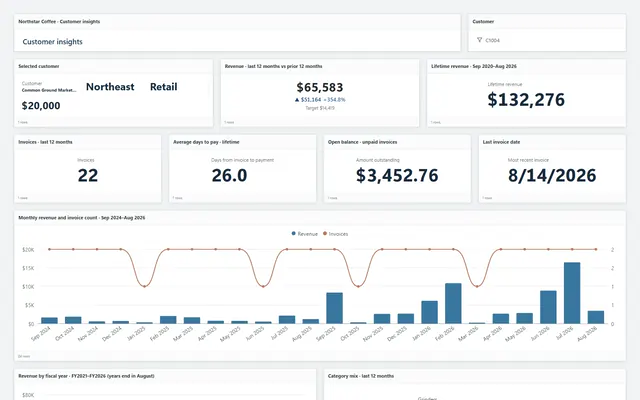
The same report types run in the demo on Northstar Coffee, an invented company.
Customer statements
One PDF per customer with invoices, payments, credits, and aged buckets, page N of M, sent on the first of the month.
Sales by item and class matrix
Items down the side, classes or months across the top, quantity and amount in each cell, with a drill to the invoice lines.
AR aging dashboard
Open balances by customer and bucket, collections trend, and a right-click from any bar to the invoices behind it.
Job profitability
Revenue, cost, and margin by customer job, delivered as Excel with live formulas to the owner every Friday.
Tau and QuickBooks: the questions we get asked.
What about QuickBooks Enterprise or Desktop?
A sync into a database that Tau reads. Many Enterprise customers already have one for Excel, and Tau starts from it.
Can Tau consolidate several QuickBooks companies?
Yes. Company becomes a column in Tau's copy, so one report can filter, group, or send one PDF per company.
See it on your QuickBooks data.
Tell us how you run QuickBooks and the report you wish you had. We will build it with you, live.