Odoo reporting for when the built-in views are not enough.
Odoo's list, pivot, and graph views are quick for one model. Tau handles the question that crosses models, the printed pack with page numbers, the matrix by salesperson and month, and the weekly PDF.
Where Odoo reporting turns into development.
Every model has list, pivot, and graph views, and for one model they are quick. The moment a question spans models, such as order lines with stock on hand and the customer's overdue balance, you are choosing between Studio, a custom module, or a database view someone has to maintain.
Printed reports are templates a developer edits, and a quote for a small change can run to thousands. There is no built-in way to schedule a pack of PDFs to a list of people each week.
“you can't just fetch some data from one model into another.”
“their reply was a $2500 customization.”
How Tau connects to Odoo.
On-premises and Odoo.sh, Tau connects to the database behind Odoo with a read-only login and reads it directly. Odoo's data is well organised, which suits the assistant that writes a report from a plain question.
On Odoo Online, where the database is not exposed, Tau signs in with a read-only login and keeps an up-to-date copy of the models you choose beside the reporting engine, refreshed as records change. Either way, Odoo is read, never written.
Runs on your server. Windows, Linux, or a container. Nothing leaves your network unless you schedule a delivery.
An Odoo reporting alternative that does not need a developer.
Odoo's views are quick for one model, and printed documents need a developer. Tau is for reports that cross models, print as a pack, or go out on a schedule.
| What you need | With Odoo's built-in reports, pivot views, and PDF templates | With Tau |
|---|---|---|
| Printed documents | Templates edited by a developer, quoted per change. | Printed reports designed in the browser, no template code. |
| Cross-model reports | One model per view; combining them needs a custom module. | One report across sales, stock, and accounting; the assistant writes it for you. |
| Pivots | A pivot view per model, exported to Excel. | A matrix with pivot columns, subtotals, and totals, printable. |
| Dashboards | The Dashboards app or a third-party module. | Dashboards over the same data, with drill-through and scheduled snapshots. |
| Delivery | Email templates per document; scheduling needs custom code. | Scheduled PDF or Excel to a list, per customer or per company. |
Power BI on Odoo, and why it depends on where you host.
Power BI reaches an on-premises or Odoo.sh database through a gateway, then models hundreds of tables in DAX, and on Odoo Online it needs a third-party connector. Tau reads the database directly with no gateway, or keeps a copy on Odoo Online, and prints the pack from the same query.
Reports Odoo teams build first.
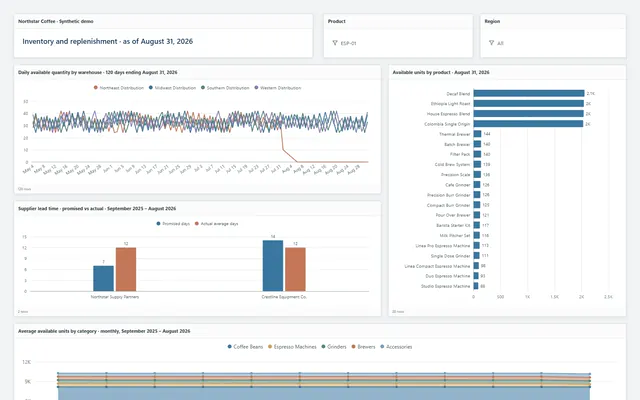
The same report types run in the demo on Northstar Coffee, an invented company.
Open sales orders by salesperson
Confirmed orders not yet delivered, grouped by salesperson with delivery status per line, emailed as a PDF each Monday.
Partner statements
One PDF per partner with open invoices, credit notes, payments, and aged buckets, sent on a schedule.
Stock on hand matrix
Product categories down the side, warehouse locations across the top, quantity and value in each cell.
Manufacturing orders behind schedule
Open manufacturing orders by workcenter and planned date, with a right-click drill to the components short.
Tau and Odoo: the questions we get asked.
Does Tau understand Odoo's data?
Tau reads any database. Odoo's layout is clear, and the assistant works well on it once you tell it your definitions.
Can Tau replace Odoo's PDF reports?
For reports built from your data, such as statements, open-order packs, and stock reports, yes. Documents printed from inside Odoo, such as an invoice from the invoice form, stay as they are.
See it on your Odoo data.
Tell us how you run Odoo and the report you wish you had. We will build it with you, live.