Sage Intacct reporting for the numbers the financial report writer does not cover.
The Financial Report Writer is excellent at statements by dimension. Tau is for everything around them: open orders, AR with a printed statement, project profitability by month, and the pack that goes out on a schedule.
Where Sage Intacct reporting gets awkward.
The Financial Report Writer does statements by entity, department, and dimension well. One step outside the general ledger, operational questions go to the Interactive Custom Report Writer and Visual Explorer: add-on modules with a fixed set of links between objects and output that is a grid, not a document.
So the pattern repeats: export to Excel, rebuild the layout, email it by hand, once per entity. Any report that needs Intacct data next to a CRM or a warehouse system is out of reach of the built-in tools.
“90% of the gripes with Intacct are reporting flexibility.”
“Dashboards load slowly. Get consistent complaints that the speed to run reports is slow.”
How Tau connects to Sage Intacct.
Tau signs in with a read-only login your Intacct administrator sets up. It keeps an up-to-date copy of the objects you choose, for every entity, beside the reporting engine, and refreshes it as records change. Reports run on the copy, so Intacct's usage limits never sit between a person and a dashboard.
If you already run Data Delivery Service or another integration into a database, Tau reads that database directly.
Runs on your server. Windows, Linux, or a container. Nothing leaves your network unless you schedule a delivery.
An Intacct report writer alternative for operational reporting.
The Financial Report Writer should keep the statements. Tau takes the operational reports that need order, item, project, and AR detail in one printed document or one dashboard.
| What you need | With the Financial Report Writer and Interactive Custom Reports | With Tau |
|---|---|---|
| Financial statements | Financial Report Writer, with dimensions and budgets. Keep it. | Tau reads the same ledger data for packs that add operational detail. |
| Operational detail reports | Interactive Custom Reports, one object at a time, limited layout. | Grouped, subtotaled, printed reports across orders, invoices, projects, and vendors. |
| Pivots and matrices | Export to Excel and build the pivot by hand. | A matrix with pivot columns and totals, on screen and on paper. |
| Scheduling | Memorized reports emailed as plain attachments, one format for everyone. | Scheduled PDF or Excel, one file per entity or customer, with delivery logs. |
| Multi-entity | Top-level reporting with entity filters, one entity at a time. | One report across entities, with entity as a group, column, or filter. |
Power BI on Sage Intacct, and where the modelling starts.
There is no Microsoft connector for Sage Intacct, so Power BI goes through Data Delivery Service or a third-party connector, then a model of entities and dimensions in DAX. Tau keeps a copy across every entity, with entity as a column, and prints the pack per entity from the same report.
Reports Sage Intacct teams build first.
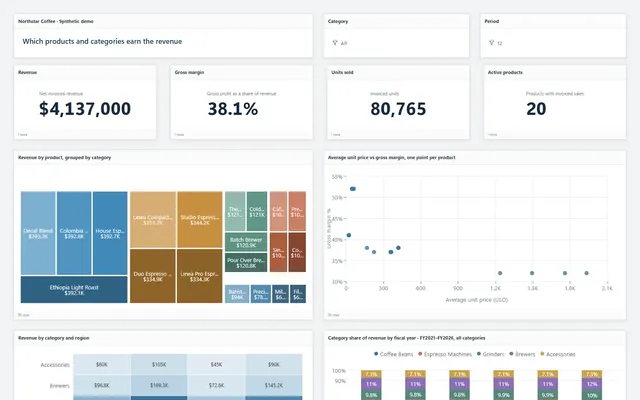
The same report types run in the demo on Northstar Coffee, an invented company.
AR aging with statements
Aged balances by customer and entity on a dashboard, plus a printed statement per customer, sent on a schedule.
Project profitability matrix
Projects down the side, months across the top, revenue, cost, and margin per cell, with a drill to the transactions.
Open order lines by warehouse
Unfulfilled order entry lines grouped by warehouse and ship date, delivered as Excel to operations every morning.
Month-end pack per entity
Cover page, summary, and detail sections, one PDF per entity, with page N of M and consistent headers.
Tau and Sage Intacct: the questions we get asked.
Does Tau replace the Financial Report Writer?
No. Keep it for the statements it does well. Tau covers operational reports, printed documents, matrices, scheduled delivery, and reports that join Intacct to other systems.
Can Tau handle multiple entities?
Yes. Entity is a column in Tau's copy, so a report can filter to one, group by it, or send one PDF per entity.
See it on your Sage Intacct data.
Tell us how you run Sage Intacct and the report you wish you had. We will build it with you, live.