Dynamics 365 Finance reporting without a data warehouse project.
Between SSRS reports that need a developer and Power BI that needs a data platform, most Finance and Supply Chain teams still hand-build operational reports. Tau reads the data you already have and turns it into printed packs, dashboards, and scheduled deliveries.
Where Dynamics 365 Finance reporting becomes a project.
Printed output is SSRS reports maintained by developers, so every change is a build and a deployment. Financial reporting covers the statements. Operational reports, such as open orders by site or vendor invoice aging, are a developer change or an Excel export.
For analysis, every supported path feeds Power BI through a Microsoft data platform, and each is a project with its own delay and cost. The simplest, and the one most customers already have, is the scheduled export to your own database.
“all subsequent saves are not persisted and you lose your work”
“Exceeded 10 minutes timeout during report processing”
How Tau connects to Dynamics 365 Finance.
Tau connects to Dynamics 365 Finance with a read-only login your administrator approves. It keeps an up-to-date copy of the entities you choose beside the reporting engine, refreshed every minute, and runs every report on that copy.
If you already export to your own database, Tau reads that directly and the data is ready to report on. A data platform that presents itself as a database works the same way.
Runs on your server. Windows, Linux, or a container. Nothing leaves your network unless you schedule a delivery.
An alternative to SSRS reports and a data warehouse project for Dynamics 365 Finance.
Financial reporting keeps the statements. Everything else is an SSRS report by a developer or a Power BI model fed by a data platform project. Tau reads the data you already have.
| What you need | With Financial reporting, SSRS reports, and Power BI over a data platform | With Tau |
|---|---|---|
| Statements | Financial reporting (Management Reporter). Keep it for the statements. | Tau reads the same ledger data for packs that add operational detail. |
| Operational reports | SSRS reports built by a developer and deployed with a release. | Printed reports designed in the browser; no developer, no deployment. |
| Dashboards | Power BI over a data platform, with a data engineer in the loop. | Dashboards over your exported data; the assistant writes the queries. |
| Freshness | Data platform first, then a model refresh, hours behind. | Read directly from your exported data, or refreshed every minute. |
| Licensing | Power BI Pro or Premium per viewer. | No viewer license; anyone with a login can open a report. |
Power BI on Dynamics 365 Finance, and the platform in between.
Microsoft's path from Dynamics 365 Finance to Power BI runs through Synapse Link, the Fabric link, or an export, then a model on top, and the result is hours behind the ledger. Tau reads the exported database directly, or keeps a copy refreshed every minute, and prints per legal entity from the same query.
Reports Dynamics 365 Finance teams build first.
The same report types run in the demo on Northstar Coffee, an invented company.
Open sales orders by site and warehouse
Grouped by legal entity, site, and warehouse with delivery status per line, sent as a PDF to each site manager every morning.
Vendor invoice aging
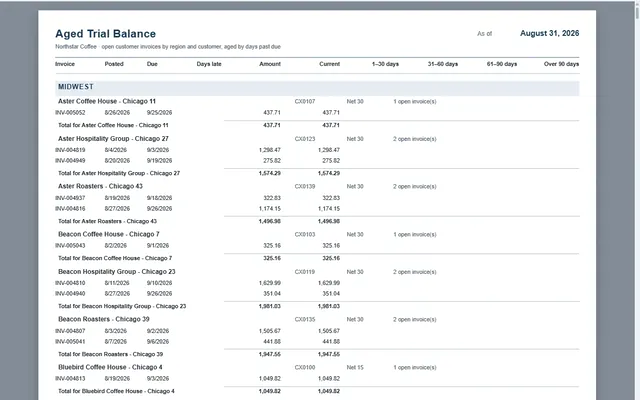
A printed aging by vendor and bucket per legal entity, plus a dashboard version with a right-click drill to the invoices.
On-hand inventory matrix
Item groups down the side, sites and warehouses across the top, physical and available quantity in each cell.
Customer statements per legal entity
One PDF per customer, with the right legal entity's header, invoices, payments, and aged balance.
Tau and Dynamics 365 Finance: the questions we get asked.
Does Tau handle multiple legal entities?
Yes. Legal entity is a column in Tau's copy, so a report can filter to one, group by it, or send one PDF per entity.
How fresh will the reports be?
Tau's copy refreshes every minute. A scheduled export is as fresh as the schedule you set, and each report shows when its data was last refreshed.
See it on your Dynamics 365 Finance data.
Tell us how you run Dynamics 365 Finance and the report you wish you had. We will build it with you, live.