Reports and dashboards straight from SQL Server.
If your ERP or operations system keeps its data in SQL Server, Tau connects with one read-only login and gives you dashboards, printed reports with page numbers, matrices, drill-through, and scheduled delivery.
Where SQL Server reporting is stuck.
The data is in a database you already own, and the tools have not kept up. SSRS still looks like 2008, and Report Builder is awkward for anyone but a developer. Crystal Reports built half the printed documents in mid-market business and is now something companies are trying to leave.
Power BI is a strong analysis tool and an awkward printing tool: a separate designer, a separate skill set, and a license per viewer. So the pattern in most SQL Server shops is extracts written by one person and opened in Excel by everyone else.
“Converting all of our existing reports to some other platform is not sustainable”
“licensing, always a sand trap with Business Objects and Crystal Reports”
How Tau connects to SQL Server.
Tau connects to SQL Server directly, on-premises, in a VM, or Azure SQL, with a read-only login IT creates. Add as many databases as you have. One report can join the ERP, the warehouse system, and a spreadsheet import. Nothing is copied.
Cloud systems such as Business Central join the same reports through an up-to-date copy Tau keeps beside the reporting engine, refreshed every minute.
Runs on your server. Windows, Linux, or a container. Nothing leaves your network unless you schedule a delivery.
An SSRS and Crystal Reports alternative for SQL Server.
SSRS is Report Builder plus a report server to maintain, and Crystal is a desktop product with an aging runtime. Tau does the same printed-report job in the browser and adds dashboards and an assistant.
| What you need | With SQL Server Reporting Services and Crystal Reports | With Tau |
|---|---|---|
| Paginated reports | Report Builder or Visual Studio for SSRS; the Crystal designer for Crystal. | Bands, groups, running totals, page numbers in a browser designer; imports Crystal files. |
| Dashboards | Not SSRS's strength; usually a second product. | Dashboards and printed reports in one tool, sharing the same data. |
| Subscriptions | SSRS subscriptions; one file per recipient needs Enterprise edition. | Scheduled delivery with one file per recipient, on any edition. |
| Ad hoc questions | Write the query, build the dataset, design the report. | Ask in plain language; the assistant writes the query and drafts the report. |
| Infrastructure | A report server, its catalog database, and the SSRS service. | One service, plain report files with version history, a read-only login. |
Power BI on SQL Server, and the gateway you would rather not run.
For a SQL Server inside your network, Power BI needs an on-premises data gateway, then a scheduled import or a slow DirectQuery, then Report Builder to print. Tau runs inside your network, reads SQL Server live with a read-only login, and prints from the same query.
Reports SQL Server teams build first.
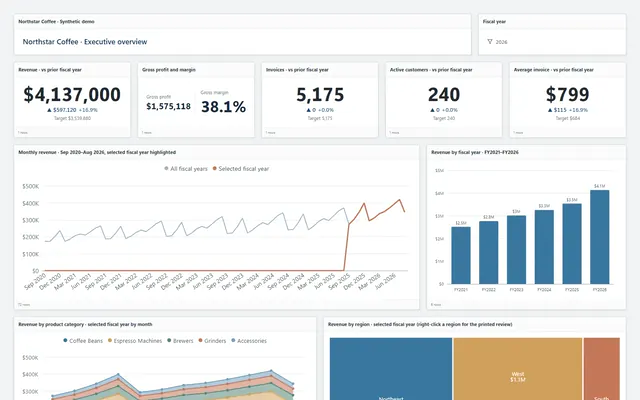
The same report types run in the demo on Northstar Coffee, an invented company.
Aged trial balance
Grouped by region and customer with aging buckets, running totals, and page N of M, delivered as a PDF at month end.
Executive dashboard
Revenue KPIs, a multi-year trend, category mix, a region treemap, and top customers, with a drill to the orders.
Sales matrix
Product categories down the side, months or regions across the top, amount and margin in each cell, exported to Excel with live formulas.
Fulfillment dashboard
On-time delivery, days to ship, an orders-to-cash funnel, and a backordered orders table with a drill to the lines.
Tau and SQL Server: the questions we get asked.
Which SQL Server versions and editions work?
Any supported SQL Server, including Express, Standard, Enterprise, and Azure SQL Database. Nothing is installed on the database server.
Can Tau replace SSRS or Crystal Reports?
For printed reports built from your data, yes: bands, running totals, subreports, and page numbers, designed in the browser and delivered on a schedule. Tau imports Crystal layouts.
See it on your SQL Server data.
Tell us how you run SQL Server and the report you wish you had. We will build it with you, live.